
Overview
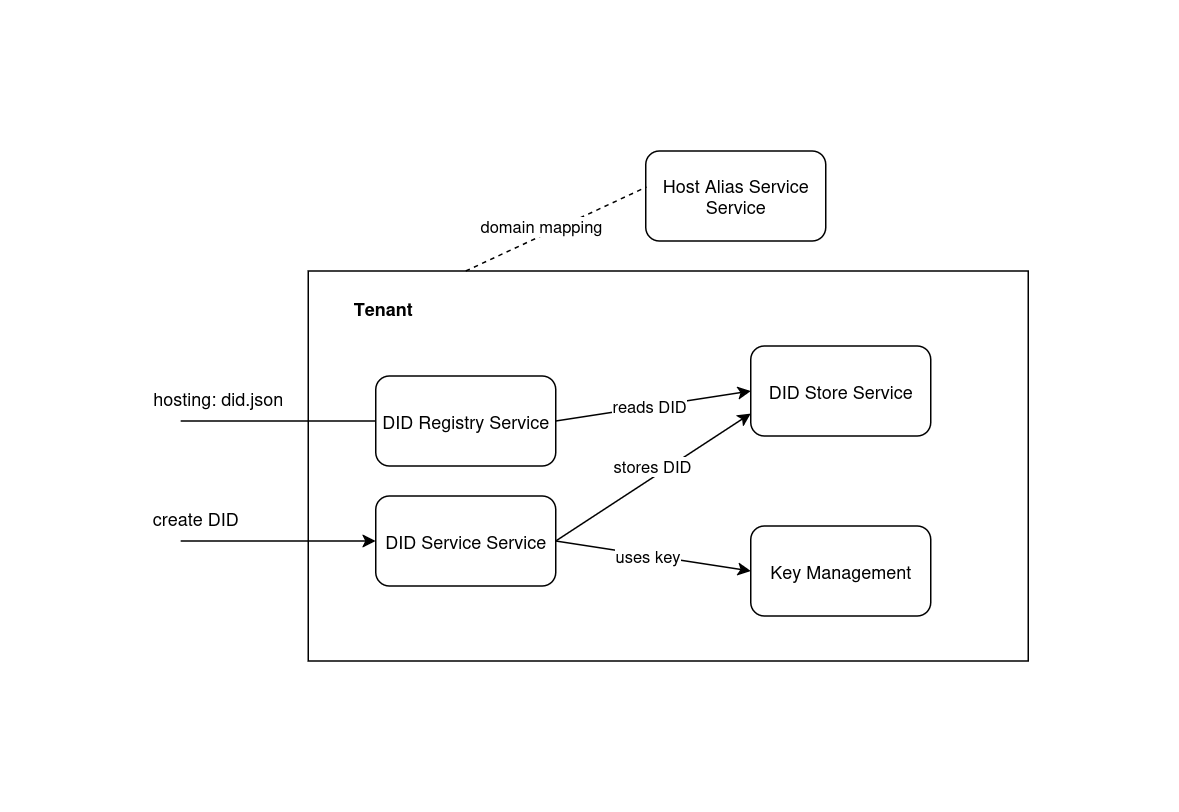
The DID Registry subsystem hosts and resolves did:web identifiers in the walt.id Enterprise Stack. Three services cooperate: the DID Store persists documents, the DID Service creates them, and the DID Registry serves them publicly.
A did:web DID must be created through the DID Service and resolved through a DID Registry. The registry stores nothing — it reads from whichever DID Stores are attached as dependencies.
The three services
| Service | Serial name | Role |
|---|---|---|
| DID Store | did-store | Persistent storage for DID entries and their documents |
| DID Service | did | Creates DIDs (did:key, did:jwk, did:web) and writes them into linked DID Stores |
| DID Registry | did-registry | Public resolution aggregator — serves did.json by querying linked DID Stores |
Loading diagram...
| Dependency | Direction | Purpose |
|---|---|---|
| DID Service → KMS | required | Key material for verification methods |
| DID Service → DID Store | required | Persist created DID documents |
| DID Registry → DID Store | required | Read-only fan-out for resolution |
The DID Registry does not create or persist DIDs. Use the DID Service to generate documents and the DID Store Service to persist them.
How did:web maps to a URL
The did:web method encodes the HTTPS location of the DID document:
did:web:<host>:<path-segments>
         │       └── colons in the DID become slashes in the URL
         └── domain (port encoding is also supported)
| DID | Resolution URL |
|---|---|
did:web:example.com:users:alice | https://example.com/users/alice/did.json |
did:web:example.com:alice | https://example.com/alice/did.json |
When creating a DID, the domain and path fields must match the URL you intend to serve. Path segments in the request (users/alice) become colon-separated segments in the DID (users:alice).
The registry does not automatically host documents at the standard did:web HTTPS path. You must either point a reverse proxy at the Enterprise API resolution endpoints or configure DNS/TLS so that https://{domain}/{path}/did.json routes to the API. See Resolution and External DID Web Hosting.
Resolution at a glance
The DID Registry exposes three unauthenticated GET patterns for serving DID documents:
| Pattern | URL | When to use |
|---|---|---|
| Service-targeted | GET /v1/{registry-target}/did-registry-service-api/registry/{id}/did.json | You know the exact registry service path |
| Tenant-relative | GET /v1/{orgId}/{target}/{id}/did.json | Registry path is stable within a tenant |
| Organization root | GET /v1/{orgId}/{id}/did.json | rootDidRegistry is configured on the organization |
See Resolution for full details, parameters, and response codes.
Tenant vs organization placement
Both did-registry and did service instances live inside the organization tree. The distinction between "tenant level" and "organization level" is where in the path the service is placed — not a separate service type.
| Scenario | Target path pattern | Root resolution URL |
|---|---|---|
| Single tenant | waltid.tenant1.did-registry.main | GET /v1/waltid/tenant1.did-registry.main/{id}/did.json |
| Organization root | waltid.did-registry.main | GET /v1/waltid/{id}/did.json (requires rootDidRegistry) |
| Multi-tenant | waltid.tenantA.did-registry.main, waltid.tenantB.did-registry.main | Per-tenant resolution URLs |
See Setup → Tenant vs organization level for configuration.
Complete flow
For did:web:example.com:users:alice:
- Create DID Store at
waltid.tenant1.did-store.main - Create KMS at
waltid.tenant1.kms.mainand generate a key - Create DID Service at
waltid.tenant1.did.main— attach KMS and DID Store dependencies - Create did:web via
POST .../dids/create/web— document written to the DID Store - Create DID Registry at
waltid.tenant1.did-registry.main— attach DID Store dependency - (Optional) Set
rootDidRegistryon the organization - Resolve publicly:
GET /v1/waltid/users:alice/did.json
Or use Composable Init to bootstrap all services in one request.
Get started
- Setup — Provision and wire the three services
- Create did:web — Generate DIDs with single or multiple keys
- Resolution — Serve and verify
did.jsonpublicly - DID Store management — List, view, update, and delete stored DIDs
Advanced:
- External DID Web Hosting — Custom domains, DNS, and reverse proxy
- Full API Reference — Swagger documentation
Operational endpoints
Service lifecycle and dependency management are documented under Administration → Service Operations: