
Setup
This guide walks through creating, configuring, and verifying an OIDC Bridge service. We will set up the service inside a tenant. If you don't have a tenant yet, you can learn how to create one here.
Prerequisites
The OIDC Bridge depends on two other services, which must exist before it can serve logins. You reference them in the dependencies array of the create request (Step 2):
- Key Management Service (KMS) — signs the issued ID tokens.
- Verifier2 Service — requests and validates the credential presentation.
You will also need:
- Your IAM system's redirect URI.
Step 1: Enable the Feature
Add oidc-bridge to enabledFeatures in your _features.conf:
enabledFeatures = [
  # ... other features
  oidc-bridge
]
Restart the Enterprise Stack for the feature to take effect.
Step 2: Create the OIDC Bridge Service
Endpoint: /v1/{target}/resource-api/services/create | API Reference
Example Request
curl -X 'POST' \
  'https://{orgID}.enterprise-sandbox.waltid.dev/v1/{target}/resource-api/services/create' \
  -H 'accept: application/json' \
  -H 'Authorization: Bearer {yourToken}' \
  -H 'Content-Type: application/json' \
  -d '{
  "type": "oidc-bridge",
  "issuerUrl": "https://enterprise.example.com",
  "clients": {
    "my-iam": {
      "clientId": "my-iam",
      "clientSecret": "***",
      "redirectUris": ["https://iam.example.com/callback"],
      "allowedScopes": ["openid", "profile", "email"]
    }
  },
  "defaultClaimMappings": [
    { "oidcClaim": "sub", "credentialPath": "$[\"org.iso.18013.5.1\"][\"document_number\"]", "transform": "NONE" },
    { "oidcClaim": "given_name", "credentialPath": "$[\"org.iso.18013.5.1\"][\"given_name\"]", "transform": "NONE" },
    { "oidcClaim": "family_name", "credentialPath": "$[\"org.iso.18013.5.1\"][\"family_name\"]", "transform": "NONE" }
  ],
  "flows": {
    "qr": {
      "enabled": true,
      "buttonLabel": "Scan QR Code",
      "verificationSetup": {
        "flow_type": "cross_device",
        "core_flow": {
          "dcql_query": {
            "credentials": [
              {
                "id": "mdl",
                "format": "mso_mdoc",
                "meta": { "doctype_value": "org.iso.18013.5.1.mDL" },
                "claims": [
                  { "path": ["org.iso.18013.5.1", "given_name"] },
                  { "path": ["org.iso.18013.5.1", "family_name"] },
                  { "path": ["org.iso.18013.5.1", "document_number"] }
                ]
              }
            ]
          }
        }
      }
    }
  },
  "presentationTimeoutSeconds": 300,
  "uiConfig": {
    "brandName": "My Company",
    "primaryColor": "#3B82F6",
    "webWalletBaseUrl": "https://wallet.example.com"
  },
  "dependencies": [
    "{organizationID}.{tenantID}.kms",
    "{organizationID}.{tenantID}.verifier2"
  ]
}'
Every enabled flow needs a verificationSetup. This is the credential request (the DCQL query / OID4VP Authorization Request) the OIDC bridge sends to the wallet.
Path Parameters
orgID: String (required) - Your organization's base URL or a valid host alias. For example, if your organization is namedtest, your default base URL istest.enterprise-sandbox.waltid.devon the sandbox environment.target: resourceIdentifier (required) - The organization + tenant to create the service in, plus the new service's ID:{organizationID}.{tenantID}.oidc-bridge, e.g.waltid.tenant1.oidc-bridge.
Header Parameters
Authorization: String (required) - Bearer token for Enterprise Stack authentication. Format:Bearer {token}.
Body Parameters
type: serviceType (required) - The type of service to create. Must be"oidc-bridge".issuerUrl: String (required) - Base URL of your Enterprise Stack. Used to build the OIDCissuer(see Step 3).clients: Object (required) - Map of client ID to client configuration. One entry per IAM system.Expand to see client configuration properties
clientId: String - OIDC client identifier.clientSecret: String - Client secret for authentication.clientName(optional): String - Human-readable client name.redirectUris: Array of Strings - Allowed redirect URIs (exact match).allowedScopes(optional): Array of Strings - Allowed OIDC scopes. Defaults to["openid", "profile", "email"].claimMappings(optional): Array - OverridesdefaultClaimMappingsfor this client.verificationSetup(optional): Object - Overrides the flow's verification setup for this client. See Verification Setup and DCQL.
defaultClaimMappings(optional): Array - Claim mappings applied when a client has none of its own. Defaults to[]. Each mapping has:Expand to see claim mapping properties
oidcClaim: String - Target OIDC claim name (e.g.given_name).credentialPath: String - JSONPath to the credential attribute.transform(optional): String - One ofNONE,LOWERCASE,UPPERCASE,hash_sha256. Defaults toNONE.credentialId(optional): String - For multi-credential (DCQL) queries, the credential-queryidin the flow'sdcql_queryto extract this claim from. If omitted, the first presented credential whose credentialPath resolves is used. If set but no matching credential was presented, the mapping is skipped (the claim is omitted).
See Claim Mappings for details.
flows(optional): Object - Presentation flow configuration, keyed byqr,dc_api,deep_link, andweb_wallet.Expand to see flow configuration properties
Each flow accepts:
enabled: Boolean - Enable/disable this flow. Defaults tofalse.buttonLabel(optional): String - Text shown on the presentation-selection button.targetUrl(optional): String - (web_walletonly) URL to redirect to.verificationSetup: Object - The credential request (DCQL query) for this flow. Required for the flow to work unless a client-level or service-level setup covers it (see the resolution order in the callout under Step 2). Its value is a Verifier2 verification request. See Verification Request and Multi-Flow Configuration.
tokenLifetime(optional): Object - Token lifetimes.Expand to see token lifetime properties
idTokenExpirySeconds: Number - ID token lifetime. Defaults to3600.accessTokenExpirySeconds: Number - Access token lifetime. Defaults to3600.authCodeExpirySeconds: Number - Authorization code lifetime. Defaults to300.
presentationTimeoutSeconds(optional): Number - How long a presentation session stays valid. Defaults to300.uiConfig(optional): Object - Presentation-page branding.Expand to see UI configuration properties
brandName(optional): String - Organization name shown on the presentation page.primaryColor(optional): String - Hex color for branding.logoUrl(optional): String - Logo URL.webWalletBaseUrl(optional): String - Base URL for the web wallet flow.
dependencies(optional): Array of Strings - Resource paths of the services this bridge depends on: the KMS and Verifier2 services. Each listed service must already exist — otherwise the whole create request fails with400.
Response Codes
201- Service created successfully. The response body is the full created configuration, including server-applied defaults (enabled,allowedScopes,tokenLifetime,presentationTimeoutSeconds).
Example Response
{
  "type": "oidc-bridge",
  "traversable": true,
  "_id": "{target}",
  "issuerUrl": "https://enterprise.example.com",
  "enabled": true,
  "clients": {
    "my-iam": {
      "clientId": "my-iam",
      "clientSecret": "***",
      "redirectUris": ["https://iam.example.com/callback"],
      "allowedScopes": ["openid", "profile", "email"]
    }
  },
  "defaultClaimMappings": [ ... ],
  "tokenLifetime": {
    "idTokenExpirySeconds": 3600,
    "accessTokenExpirySeconds": 3600,
    "authCodeExpirySeconds": 300
  },
  "presentationTimeoutSeconds": 300,
  "parent": "{organizationID}.{tenantID}",
  "createdAt": "2026-01-01T00:00:00Z",
  "updatedAt": "2026-01-01T00:00:00Z"
}
Verification Setup
The verificationSetup included in each flow in Create the OIDC Bridge Service above is the same object you would send to Verifier2 directly.
{
  "verificationSetup": {
    "flow_type": "cross_device",
    "core_flow": {
      "dcql_query": {
        "credentials": [{
          "id": "mdl",
          "format": "mso_mdoc",
          "meta": { "doctype_value": "org.iso.18013.5.1.mDL" },
          "claims": [
            { "path": ["org.iso.18013.5.1", "given_name"] },
            { "path": ["org.iso.18013.5.1", "family_name"] },
            { "path": ["org.iso.18013.5.1", "document_number"] }
          ]
        }]
      }
    }
  }
}
For the full VerificationSessionSetup shape (flow types, policies, signing/encryption keys, expectedOrigins for DC API) and DCQL syntax, see the Verifier2 docs — this is the authoritative reference:
Step 3: Verify OIDC Endpoints
All OIDC endpoints are exposed under /v1/{target}/oidc-bridge-api/:
| Endpoint | Description |
|---|---|
.well-known/openid-configuration | OIDC discovery document |
authorize | Authorization endpoint (user-facing) |
token | Token endpoint (backend) |
jwks | JSON Web Key Set (public keys) |
userinfo | UserInfo endpoint |
Check that the bridge is serving them:
# Discovery document
curl 'https://{orgID}.enterprise-sandbox.waltid.dev/v1/{target}/oidc-bridge-api/.well-known/openid-configuration'

# JWKS (public keys)
curl 'https://{orgID}.enterprise-sandbox.waltid.dev/v1/{target}/oidc-bridge-api/jwks'
Example Response (discovery document)
{
  "issuer": "https://enterprise.example.com/v1/{target}/oidc-bridge-api",
  "authorization_endpoint": "https://enterprise.example.com/v1/{target}/oidc-bridge-api/authorize",
  "token_endpoint": "https://enterprise.example.com/v1/{target}/oidc-bridge-api/token",
  "userinfo_endpoint": "https://enterprise.example.com/v1/{target}/oidc-bridge-api/userinfo",
  "jwks_uri": "https://enterprise.example.com/v1/{target}/oidc-bridge-api/jwks",
  "response_types_supported": ["code"],
  "grant_types_supported": ["authorization_code"],
  "subject_types_supported": ["public"],
  "id_token_signing_alg_values_supported": ["ES256", "EdDSA"],
  "scopes_supported": ["openid", "profile", "email"],
  "token_endpoint_auth_methods_supported": ["client_secret_basic", "client_secret_post"],
  "code_challenge_methods_supported": ["S256"],
  "claims_supported": ["sub", "iss", "aud", "iat", "exp", "auth_time", "nonce", "name", "email", "given_name", "family_name"]
}
The issuer value is your issuerUrl plus the /v1/{target}/oidc-bridge-api path — not the bare issuerUrl. Configure your IAM system with the full discovery URL and it derives the rest.
Step 4: Configure Your IAM System
Use the discovery URL to configure your IAM system (Keycloak, Auth0, etc.):
Discovery URL:
https://{orgID}.enterprise-sandbox.waltid.dev/v1/{target}/oidc-bridge-api/.well-known/openid-configuration
Client credentials:
- Client ID and Client Secret — from your
clientsconfiguration. - Client authentication:
client_secret_postorclient_secret_basic.
See Keycloak Integration for a complete example.
Step 5: Test the Flow
- Navigate to your IAM system's login page.
- Click "Login with Verifiable Credential" (or similar).
- You are redirected to the OIDC Bridge presentation page.
- Choose a presentation method (QR, DC API, deep link, or web wallet).
- Present your credential.
- You are redirected back to the IAM system, logged in.
Example presentation page:
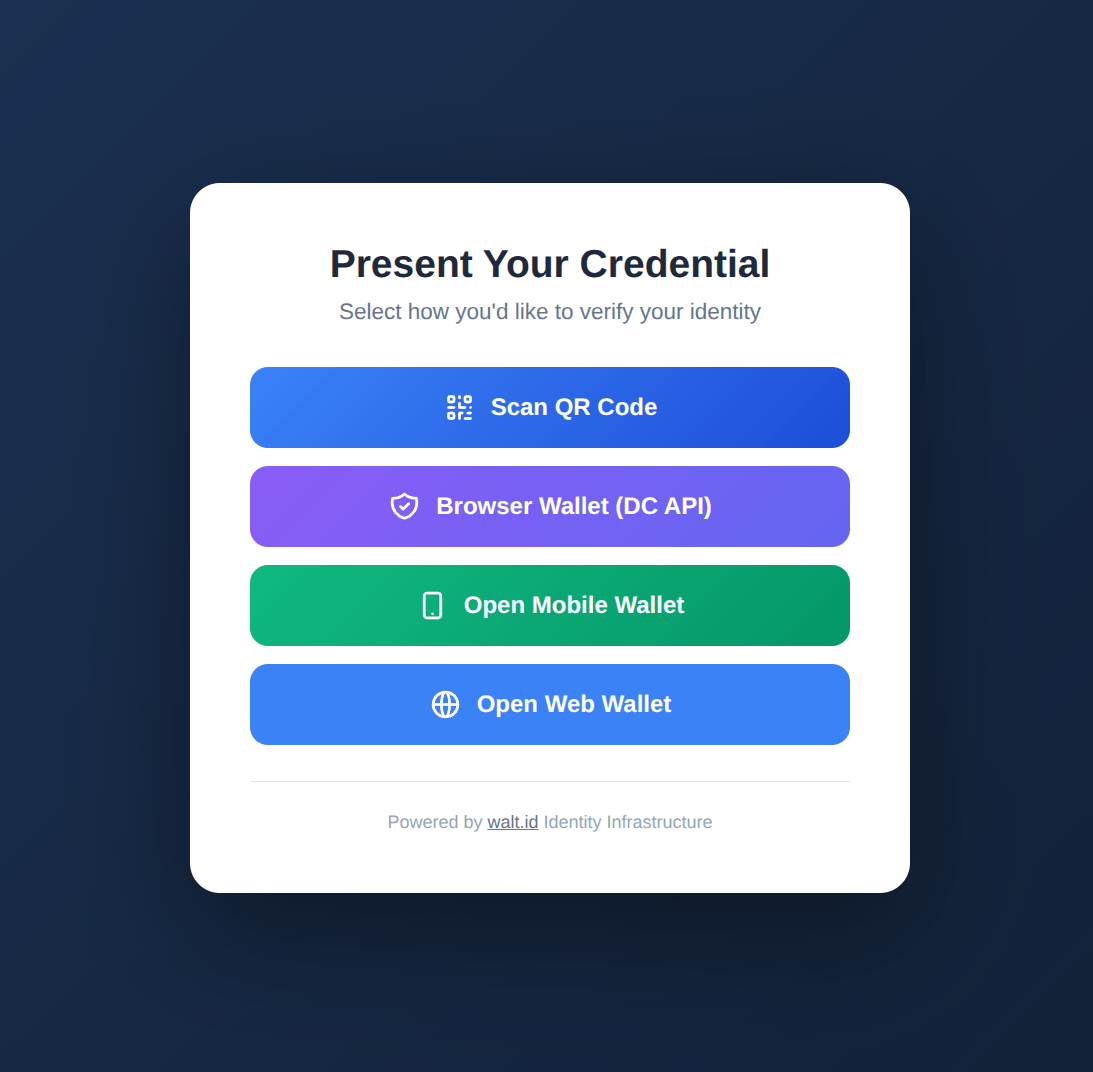
Users see all enabled flows with the button labels you configured.
Credential Type Examples
Claim paths and DCQL metadata differ by credential format. The two most common are mDL (namespaced) and SD-JWT VC (flat).
mDL (ISO 18013-5.1)
mDL credentials use namespaced claim paths under org.iso.18013.5.1:
{
  "defaultClaimMappings": [
    { "oidcClaim": "sub", "credentialPath": "$[\"org.iso.18013.5.1\"][\"document_number\"]", "transform": "NONE" },
    { "oidcClaim": "given_name", "credentialPath": "$[\"org.iso.18013.5.1\"][\"given_name\"]", "transform": "NONE" },
    { "oidcClaim": "family_name", "credentialPath": "$[\"org.iso.18013.5.1\"][\"family_name\"]", "transform": "NONE" },
    { "oidcClaim": "birthdate", "credentialPath": "$[\"org.iso.18013.5.1\"][\"birth_date\"]", "transform": "NONE" }
  ]
}
Matching DCQL for the QR flow:
{
  "flows": {
    "qr": {
      "enabled": true,
      "verificationSetup": {
        "flow_type": "cross_device",
        "core_flow": {
          "dcql_query": {
            "credentials": [{
              "id": "mdl",
              "format": "mso_mdoc",
              "meta": { "doctype_value": "org.iso.18013.5.1.mDL" },
              "claims": [
                { "path": ["org.iso.18013.5.1", "given_name"] },
                { "path": ["org.iso.18013.5.1", "family_name"] },
                { "path": ["org.iso.18013.5.1", "birth_date"] },
                { "path": ["org.iso.18013.5.1", "document_number"] }
              ]
            }]
          }
        }
      }
    }
  }
}
SD-JWT VC
SD-JWT VCs use flat claim paths (no namespace prefix):
{
  "defaultClaimMappings": [
    { "oidcClaim": "sub", "credentialPath": "$.email", "transform": "hash_sha256" },
    { "oidcClaim": "given_name", "credentialPath": "$.given_name", "transform": "NONE" },
    { "oidcClaim": "family_name", "credentialPath": "$.family_name", "transform": "NONE" },
    { "oidcClaim": "email", "credentialPath": "$.email", "transform": "LOWERCASE" },
    { "oidcClaim": "birthdate", "credentialPath": "$.birthdate", "transform": "NONE" }
  ]
}
Matching DCQL for the QR flow:
{
  "flows": {
    "qr": {
      "enabled": true,
      "verificationSetup": {
        "flow_type": "cross_device",
        "core_flow": {
          "dcql_query": {
            "credentials": [{
              "id": "identity-vc",
              "format": "dc+sd-jwt",
              "meta": { "vct_values": ["IdentityCredential"] },
              "claims": [
                { "path": ["given_name"] },
                { "path": ["family_name"] },
                { "path": ["email"] },
                { "path": ["birthdate"] }
              ]
            }]
          }
        }
      }
    }
  }
}
mDL vs SD-JWT VC: Key Differences
| Aspect | mDL | SD-JWT VC |
|---|---|---|
| Standard | ISO 18013-5 | IETF SD-JWT VC |
| Format | mso_mdoc | dc+sd-jwt |
| Claim structure | Namespaced (org.iso.18013.5.1) | Flat (root level) |
| Example path | $["org.iso.18013.5.1"]["given_name"] | $.given_name |
| DCQL metadata | doctype_value | vct_values |
| Typical use | Government IDs (driver's license) | General verifiable credentials |
For multi-credential (OR) queries and per-credential claim mappings with credentialId, see Claim Mappings.
Updating Configuration
Update an existing OIDC Bridge by sending the full configuration to the update endpoint. The update replaces the stored configuration wholesale; attached dependencies are preserved.
Endpoint: /v1/{target}/oidc-bridge-api/configuration/update | API Reference
Example Request
curl -X 'PUT' \
  'https://{orgID}.enterprise-sandbox.waltid.dev/v1/{target}/oidc-bridge-api/configuration/update' \
  -H 'Authorization: Bearer {yourToken}' \
  -H 'Content-Type: application/json' \
  -d '{
  "_id": "{target}",
  "issuerUrl": "https://enterprise.example.com",
  "clients": { "...": "..." },
  "defaultClaimMappings": [ ... ],
  "flows": { "...": "..." }
}'
Body Parameters
- The full service configuration, using the same fields as Step 2, with two differences: the body must include
_idand must not includetype. (Create is the opposite:typeis required and_idis taken from the path.)
Response Codes
200- Configuration updated.
Deleting the Service
Endpoint: /v1/{target}/resource-api/resources/delete-recursive | API Reference
Example Request
curl -X 'DELETE' \
  'https://{orgID}.enterprise-sandbox.waltid.dev/v1/{target}/resource-api/resources/delete-recursive' \
  -H 'Authorization: Bearer {yourToken}'
Response Codes
202- Service and all of its sessions deleted.
Deleting the OIDC Bridge breaks any IAM integrations using it. Ensure all relying parties are migrated before deletion.
Troubleshooting
invalid_client Error
Cause: Client credentials mismatch.
Fix: Verify clientId and clientSecret match exactly in both the OIDC Bridge and your IAM system.
redirect_uri Mismatch Error
Cause: Redirect URI not in the allowlist.
Fix: Ensure the redirect URI in your IAM system matches one of the redirectUris exactly (protocol, host, port, and path).
Discovery Document 404
Cause: OIDC Bridge not created, or the feature is not enabled.
Fix:
- Check the feature is enabled:
oidc-bridgein_features.conf. - Verify the service exists:
GET /v1/{target}/oidc-bridge-api/configuration/view. - Check the path:
/oidc-bridge-api/.well-known/openid-configuration.
Service Creation Fails with a Cast Error
Cause: The create request was sent to the tenant path instead of the full service path, so the server tried to overwrite the tenant.
Fix: POST to the full service target — /v1/{organizationID}.{tenantID}.oidc-bridge/resource-api/services/create — not /v1/{organizationID}.{tenantID}/....
Presentation Timeout
Cause: The user didn't complete the presentation in time.
Fix: Increase presentationTimeoutSeconds (default: 300).
Next Steps
- Keycloak Integration — Complete Keycloak setup guide.
- Claim Mappings — Advanced claim extraction.
- Multi-Flow Configuration — Configure presentation flows.